


WRAL News App
4.54.12K Reviews
App Specs
- Version
- 8.531
- Updated On
- License
- Free
- Downloads
- 100,000+
- Developer
- Capitol Broadcasting Company
- Categories
- News & Magazines
- Platform
- Android
Screenshots

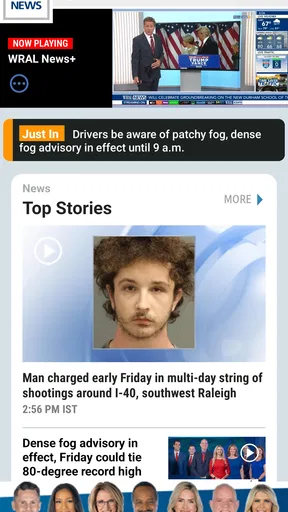
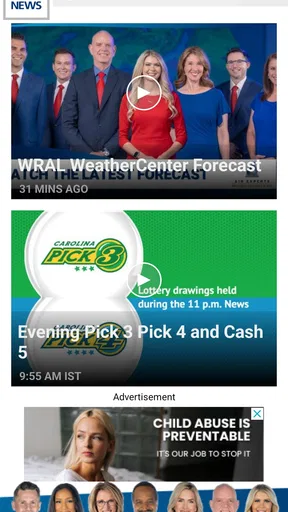
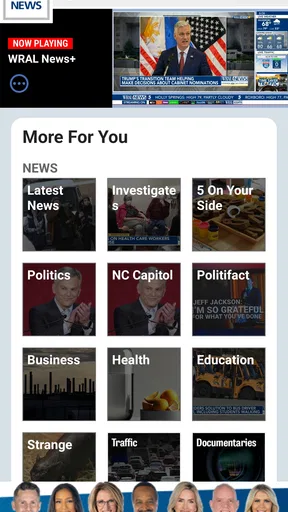
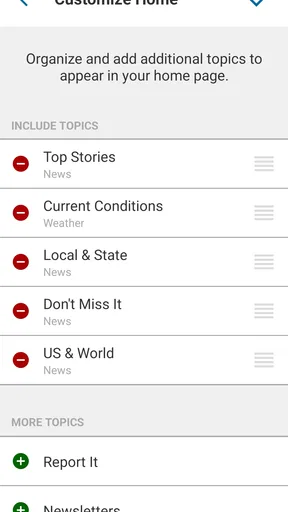
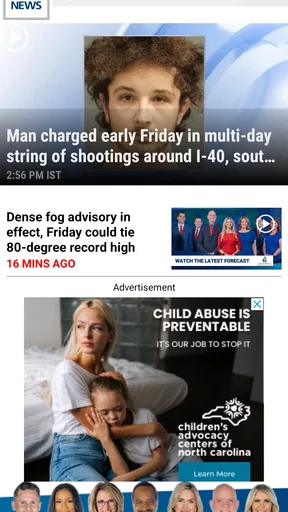
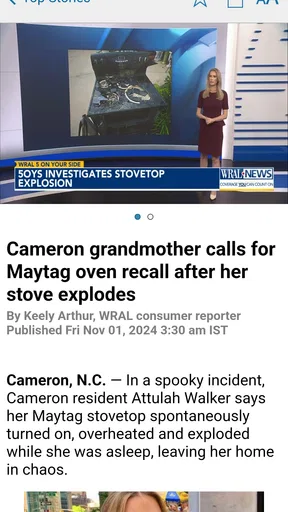
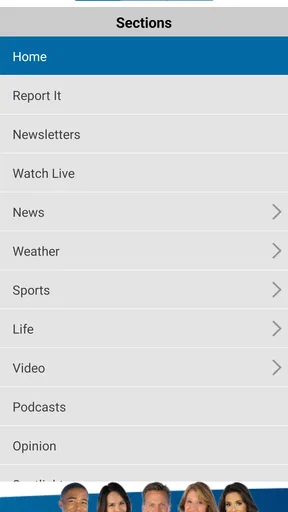
 Analysis by AppCompare
I tend to judge a news app less by its headline count than by what happens when I need information quickly. In that situation, WRAL News feels focused and practical: it brings together local and broader headlines, weather, sports, and other news coverage in one place. It is a free News & Magazines app from Capitol Broadcasting Company, rated for Everyone, and it has been available since Jun 7, 2010. That long presence matters to me because a news app becomes useful when it fits into a routine rather than being opened only once.
My experience with it is best described as dependable for people who want a central place to check what is happening, especially when weather and local reporting matter as much as national headlines. The app has a 4.5 average from around 15 thousand ratings, with more than 100 thousand installs, so it is clearly not an obscure download. Still, popularity does not remove the small points of friction that can appear during installation, loading, or everyday use. I would recommend it, but I would also set it up with realistic expectations.
Getting past the first points of friction
When I’m troubleshooting a news app, I try to separate a one-off delay from a pattern before changing settings or reinstalling. I’ll check whether the connection is steady, then test the same simple routine again when the phone is working normally. That gives me a more useful basis for deciding whether the friction is temporary or whether a different daily news setup would suit me better.
Why the first launch can feel less immediate than expected
When I install a news app, I want to reach a useful story or forecast without having to make several decisions first. WRAL News is straightforward in purpose, but the first launch can still feel like a pause before the actual reading begins. A user may need to allow the app to finish loading its current content, respond to system prompts, or wait while the phone establishes a connection. If the opening screen appears empty or slow, my first assumption is not that the app is broken. News content depends on a live connection, and a weak signal can make a normal loading process look like a failure.
The most useful first check is simple: move from mobile data to a reliable Wi-Fi connection, or do the reverse, and reopen the app. I also make sure the phone is not in an extreme battery-saving state that restricts background activity. These are ordinary checks, but they solve more problems than repeatedly tapping the same screen. If other apps are also struggling to load fresh content, the issue is probably broader than WRAL News.
Another common sticking point is expecting every part of the app to behave like a saved newspaper. The main value here is current coverage, so I treat the app as a live news reader rather than a permanent offline archive. If I know I will be travelling or entering an area with poor reception, I read important stories before leaving instead of assuming that every page will remain available without a connection.
What I check before blaming the application
My setup routine is deliberately short. I confirm that the phone meets the minimum operating-system requirement of version 9, then install the current release, which is version 8.531. I leave enough free storage for the phone to work normally, close apps that are consuming unusual resources, and restart the device if the installation or first launch behaves oddly. A restart sounds basic, but it clears temporary system problems without changing the app itself.
Worth Reading Before You Choose

EA SPORTS FC Mobile 26 Is a Bigger Football Game, but It Takes Time

Flipboard Shows What News Apps Must Do Beyond the Feed

Switching to Android Auto Means Rethinking Your Driving Routine

Google Calendar Makes a Crowded Week Easier to Manage

Ludo King Makes the Most of the Minutes Between Plans

Baby Panda World Brings Quick Play to Modern Phones, but Its Game Library Feels Busy
I also check the phone’s automatic date and time. A badly incorrect clock can interfere with secure connections and make a current-information app appear unreliable. This is not a special WRAL setting; it is a general phone check that is easy to overlook. If the app opens but does not refresh while websites and other services work normally, I close it completely and launch it again before trying more disruptive steps.
Notifications deserve a deliberate decision rather than an automatic one. I prefer to receive only alerts that genuinely help me, because a constant stream of breaking news can turn a useful app into background noise. If alerts do not appear, I check both the app’s notification controls and the phone’s system notification settings. If I do not want alerts, I disable them and use the app when I choose. That gives me control without confusing a preference with a technical problem.
My practical setup tip is to test one complete routine immediately: open the app, read a headline, switch to weather, and return to the news feed. This tells me more than simply seeing the home screen. It checks whether the content loads, whether navigation responds, and whether the phone can handle the app’s basic flow. I would rather discover a connection or system issue at home than during a morning commute.
Making the daily reading routine less wasteful
Once the app is working, I use it in short visits instead of leaving it open all day. In the morning, I scan the main headlines to understand the day. Later, I return when weather conditions or a developing local story could affect my plans. This approach is more efficient than repeatedly refreshing without a reason, and it helps me notice whether a story has actually changed.
The combination of news, weather, and sports is the strongest reason to keep this app installed. I do not need to jump between a separate local news app, a weather tool, and a sports source for a quick check. That does not mean it replaces every specialist service. A dedicated weather application may offer a deeper forecasting experience for someone who studies conditions closely, while a specialist sports app may be better for detailed scores or league coverage. WRAL News is more useful as a compact daily information hub.
I also pay attention to how I read longer stories. On a small phone screen, opening several articles in rapid succession can make it difficult to remember what I have already seen. I read one story fully, return to the main feed, and then choose the next item. It is a small workflow change, but it makes the app feel calmer and reduces the temptation to treat every headline as equally urgent.
Recovering when a feed or story stops responding
If a page stops loading, I first wait briefly and try the action once more. I then switch to another section and return, because this distinguishes a single stalled page from a wider connection problem. If nothing updates, I close the app, check the connection, and reopen it. I avoid repeatedly pressing refresh, since that rarely helps when the phone has no stable route to the service.
When the app opens but displays older material, I compare the result with another current source on the same phone. If other services are also outdated, I troubleshoot the connection or device. If only WRAL News appears affected, I restart the app and check whether the phone is restricting its network activity. I do not immediately uninstall it, because that creates extra setup work and may not address the real cause.
Clearing temporary app storage can be a reasonable later step on Android when a screen repeatedly behaves incorrectly, but I use it carefully. I first make sure I understand what the phone is offering to remove, and I avoid deleting anything that I may want to keep. Reinstalling is my last routine measure, not my first. It takes time, may reset preferences, and is unnecessary for a one-time slow load.
On iOS, I use the equivalent low-risk sequence: close the app, restart the device, check network access, and install available updates through the normal system process. I do not assume that an Android instruction applies exactly to an iPhone. The goal is the same on both platforms, but the menus and controls differ. Keeping troubleshooting simple also makes it easier to identify which step actually helped.
Separating application problems from phone and network problems
A live news app is especially sensitive to conditions outside the app. Underground stations, crowded public networks, weak indoor reception, and a phone that has aggressively limited background activity can all interrupt updates. If WRAL News works normally on Wi-Fi but not on mobile data, I investigate the mobile connection or its system settings before concluding that the application is at fault.
The same logic applies to storage and performance. A phone that is nearly full may make installations, updates, and general app use unreliable. An older device may also take longer to open current content, particularly when several other apps are active. I close unnecessary apps, free some space, and restart the phone before making a judgement. If several unrelated apps crash or freeze, replacing WRAL News would not solve the underlying device issue.
There is also a difference between a content preference and a technical defect. I may dislike the order of headlines, want more detailed forecasts, or prefer a different sports presentation. Those are valid reasons to choose another service, but they are not evidence that the app is malfunctioning. I find it helpful to decide whether I am asking for a repair or looking for a different editorial and feature balance.
For people who depend on alerts, I recommend checking the phone at a quiet time rather than waiting for an important event. Confirm that notifications are permitted, that the device is not silencing them through a focus or do-not-disturb mode, and that the app can connect normally. I would never rely on one app alone for a safety-critical decision. For urgent weather or emergency information, I follow the official local guidance available to me and treat a news app as one useful source among others.
A realistic day with the app
Imagine a weekday morning when I need to decide whether to leave early, change my route, or pack differently. I open WRAL News on Wi-Fi before leaving, scan the latest headlines, and check the weather section. If a local story affects traffic or public activity, I read the full article rather than relying on its headline. On the way out, I do not keep refreshing the app in an area where reception is unreliable. Later, when I have a stable connection, I check for developments and then close it.
This routine shows where the app earns its place. It combines the information I need for a quick local briefing without making me maintain several separate news sources. It also shows the trade-off: if I need minute-by-minute specialist data, I may still open a dedicated service. WRAL News works best when the question is, “What should I know about the day?” rather than, “Can this one app provide every possible detail about a narrow subject?”
Who will appreciate it, and who should look elsewhere
I think the app is a good fit for readers who want news, weather, and sports in one familiar place. It is especially convenient for someone who prefers a regional news source over a purely national feed. The free price removes the need to make a subscription decision before trying it, and the Everyone age rating makes it suitable for a broad household audience.
It is less suitable for a reader who wants a completely personalized multi-source news reader, a deep international perspective, or advanced specialist tools. Someone who mainly follows financial markets, technical science reporting, or a particular sports competition may get more value from a dedicated service. I would also skip it as a primary choice if my priority is extensive offline reading, because its central purpose is current connected coverage.
Compared with television news, the app is more convenient for checking one story at my own pace. Compared with a general web search, it gives me a more organized starting point instead of making me sort through unrelated pages. Compared with a social-media feed, it feels better suited to deliberate reading because I am choosing a news source rather than relying entirely on an algorithmic stream. The compromise is that I am accepting WRAL’s coverage priorities instead of building my own mix from many publishers.
My practical verdict after using it
WRAL News succeeds because its purpose is easy to understand and useful in ordinary life. I can open it for a quick briefing, check weather before making plans, and return to a developing story without needing a complicated workflow. The developer, Capitol Broadcasting Company, has built an app that feels most valuable when local awareness is part of my daily routine.
My recommendation comes with one condition: set it up patiently and judge it after testing a real reading routine, not after a single slow launch. Check the operating system, connection, notification choices, and phone performance first. If a feed stalls, use a calm recovery sequence instead of reinstalling immediately. These habits prevent many false conclusions and preserve the convenience that makes the app worthwhile.
With a 4.5 average and a substantial community of users, it has earned a credible place among free news applications. I would install it for accessible coverage of headlines, weather, and sports, while keeping a specialist source for needs that demand greater depth. For a straightforward daily news companion, WRAL News is a sensible choice; for highly customized or specialist coverage, I would pair it with something more focused.
The current version is 8.531, and the app supports devices running operating system version 9 or later. Those details are worth checking before installation, particularly on an older phone. Once the basic setup is complete, I find the experience uncomplicated: open it when I need a clear update, verify important information through appropriate official channels, and avoid treating every loading delay as an app failure. That balance is what makes it useful rather than merely convenient.
Pros
- Fast access to breaking news and local headlines
- Live weather updates
- forecasts
- and radar maps
- Video reports and news clips are easy to browse
- Push alerts help you stay informed about urgent events
- Covers North Carolina communities and regional stories well
Cons
- Some alerts may feel frequent or overly broad
- Advertising can interrupt browsing and reduce screen space
- Certain articles may load slowly on weaker connections
- Video playback can use considerable mobile data
- Coverage is less useful for users outside the WRAL region
FAQs for WRAL News App
What is the WRAL News app?
The WRAL News app is a mobile news platform from WRAL, providing local and regional coverage, especially for North Carolina and the surrounding area. After installing it, users can browse breaking news, weather updates, traffic information, sports, politics, entertainment, and community stories. The app is designed for quick access to continuously updated headlines and live coverage in one place.
Does the WRAL News app provide live news and weather updates?
Yes, the app typically includes live news coverage, developing-story updates, weather forecasts, radar information, and severe-weather alerts. Depending on your location and device settings, you may receive notifications about important local events, storms, school closings, or traffic disruptions. Users should enable notifications and location permissions if they want timely, personalized alerts rather than checking the app manually.
Is the WRAL News app free to download and use?
The WRAL News app is generally free to download from the Android and iOS app stores, and users can access a substantial amount of news without paying. However, mobile data charges may apply when streaming live video or browsing outside Wi-Fi. Some content, services, advertising arrangements, or future features may vary, so it is worth reviewing the app-store listing and its current terms before downloading.
Can I watch live video or news broadcasts in the WRAL News app?
The app may offer live video, news clips, weather coverage, press conferences, and other streaming content, depending on programming availability and your location. Video quality can change automatically according to your internet connection, and streaming may use considerable mobile data. For the smoothest experience, use a reliable Wi-Fi connection, keep the app updated, and make sure your device supports the latest version.
Does the WRAL News app collect personal information?
Like most modern news applications, WRAL News may collect certain information related to device use, analytics, advertising, location-based services, and notification preferences. The exact data practices can change with updates and may differ between Android and iOS. Before installing, review the app-store privacy section and WRAL’s privacy policy. You can also adjust notification, location, and tracking permissions through your device settings.


